 Skip to content
 Writing
How I built an autonomous OpenCode agent in Slack
How I built Pipa, an autonomous OpenCode agent in Slack, plus the open-source setup for running OpenCode from Slack on your own computer.
Pipa, my operations agent running on OpenCode and living in Slack, came from a boring problem.
The more I trusted coding agents with non-coding work, the more annoying it became that they still needed my laptop, my terminal, and my attention.
I was handing local work to OpenCode: plans, writing, research, reviews, repo cleanup, content workflows, and studio operations. Some of that work became cron jobs and recurring agent loops.
So Pipa moved into Slack.
Slack gives me channels for topics, threads for tasks, and a shared place to see what happened. Pipa can work autonomously, but I can still talk to her like a teammate.
Other teams are making the same move. Duolingo built an AI Slackbot with 180+ MCP tools and got to 250 weekly active users. Shopify shared River, its Slack-native agent that coauthored one in eight merged pull requests. Mintlify wrote that its docs agent runs on OpenCode and Daytona in sandboxes.
If you want to build your own version, you can probably point your agent at this article and have it spin one up.
Update, August 29, 2026: This article documents the hosted architecture behind Pipa when I wrote it. Pipa Local now gives you a direct way to connect OpenCode on your computer to Slack. The architecture below still matters if you want to build a hosted agent that can run without your laptop.
Install Pipa
If you already use OpenCode, install Pipa Local from your terminal:
npm install --global @usepipa/pipa
pipa init
pipa start
During setup, you choose the Slack users and channels that can use Pipa. Pipa uses the folder where you run pipa init as OpenCode’s working context, and it inherits the configuration and permissions from your OpenCode setup.
The OpenCode Slack install page has the shortest setup path. The full tutorial walks through creating the Slack app and testing your first request.
How it works
The architecture behind Pipa looks like this:
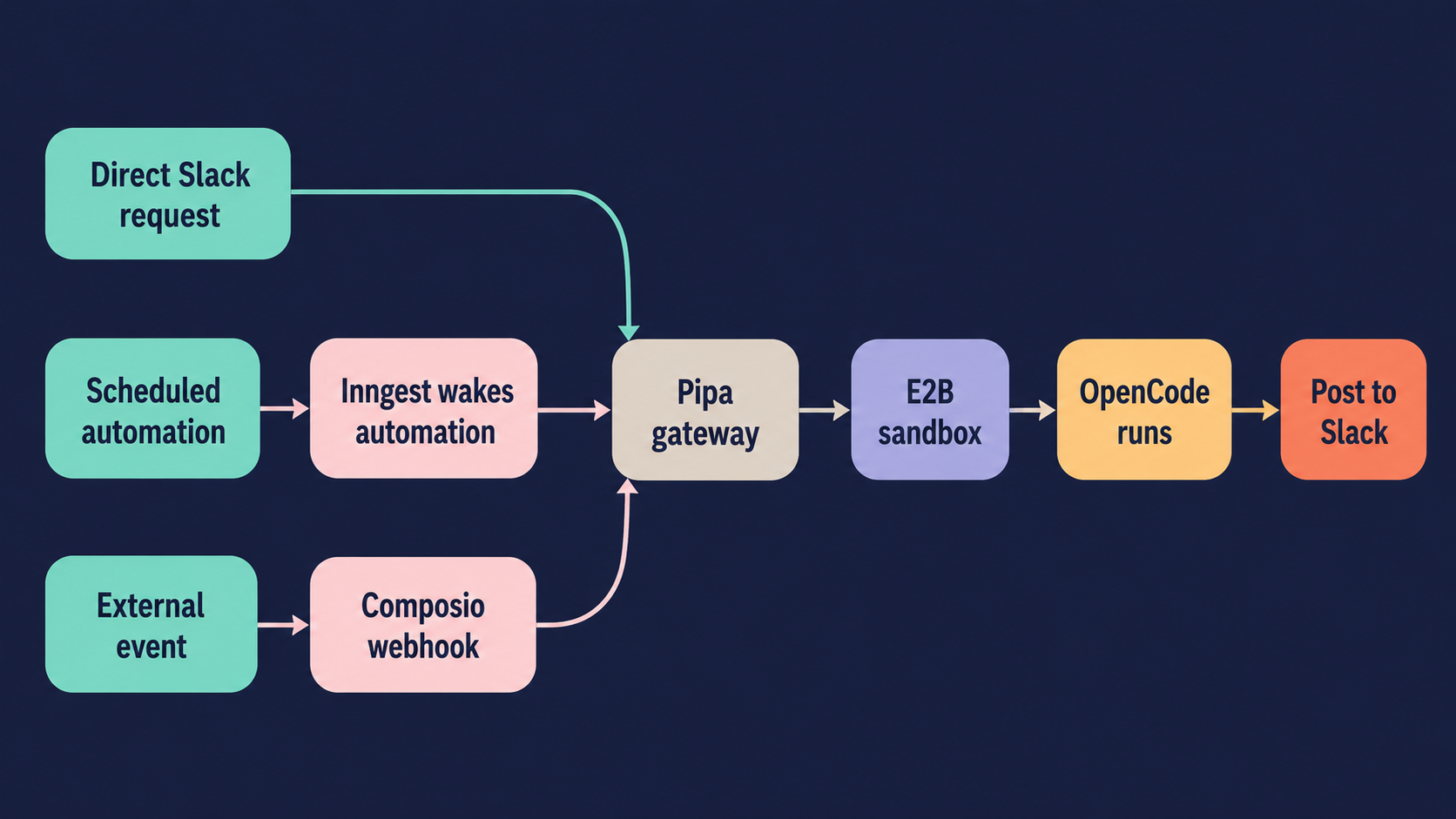
Each tool has a job.
-
Slack is where most work starts and answers land. It gives Pipa the message, requester, workspace, thread, and delivery target.
-
The gateway is the web service that receives requests. I host it on Fly. It accepts Slack events, automation API calls, trigger requests, Composio webhooks, Inngest calls, and runtime calls.
-
Inngest wakes work up. It handles scheduling, retries, cancellation, concurrency, and execution handoff.
-
E2B is the sandbox. It gives the agent its own computer to do work.
-
OpenCode is the agent harness. It is the brain that edits files, runs commands, calls tools, works in repos, and returns structured output.
-
Composio handles external triggers and tool integrations. It can wake the gateway when something happens in another app, and it makes it easy to add tool connections in Slack.
If you do not need the autonomy pieces, Slack, a sandbox, and an agent harness can get you pretty far.
Creating “autonomy”
You can stop at a setup where a Slack message starts OpenCode in a sandbox and get leverage. If you already live in Slack, that reduces friction for you and your team. Threads become workspaces. You can keep several tasks moving at once without living inside a terminal or another agent UI.
With a little more shaping, the agent can start doing more on its own.
The pieces I add after the base sandbox loop are:
-
Character and instruction files. OpenClaw popularized files like
soul.md,heartbeat.md, andcharacter.md. You can put the same kind of files into the OpenCode config. They shape behavior, set standards, and give the agent more personality. -
Automations, workflows, and triggers. This is where I get the most benefit. Inngest wakes the agent and sandbox at a set time. Sometimes the prompt is specific: run this skill on this thing every morning. Sometimes it is more like a heartbeat: look at the current state, use judgment, and decide what needs attention. Not every run starts from time. Many SaaS tools send events. If you want the agent to wake up and execute a skill when something happens, create a trigger.
-
Tool access. I use Composio because it makes broad tool access easy. If I need to give the agent something, I click a link. If the agent is blocked, it can post in Slack, say what it needs, and I can connect it. A lot happens when the agent has access to the same everyday tools I use.
-
Skills. Agent skills teach the agent how to write things and do things. This matters more with automations, because many of my scheduled prompts look like “run this skill on this target.” The skill holds the logic. The public Pipa skills live in the Pipa skills repo.
-
Memory. I use Supermemory for this. Before, Pipa loaded context files and knew to update them. A memory tool adds teammate-like recall: goals, preferences, latest business state, and small details that should carry across runs. Good memory tools also know how to supersede and delete memories, which matters once the agent has more autonomy.
My favorite pattern right now uses Linear. I keep a task list there, then Pipa can wake up, pick work, do it, ship it, and leave me something to review.
Why OpenCode
You could use the Claude SDK, the OpenAI SDK, LangChain, OpenClaw, Hermes, Codex, or another agent system and still use the pattern in this article.
I like OpenCode for a few reasons.
1. It is easy to reason about.
I have run experiments with OpenClaw and Hermes, and they are fun. They are also built around stronger autonomy patterns. But I have had more trouble making them execute as deterministically as a coding agent. Call it a skill issue, but OpenCode is easier for me to understand when it works and when it breaks.
2. It works for local synchronous work and “autonomous” Slack work.
My work now falls into two buckets: tasks I go deep on locally, and tasks that can run in Slack with less supervision. OpenCode gives me one harness for both. I am not learning the edges of two different systems.
3. It is open source and swappable.
I can change the model without rebuilding the runtime around another provider. I can swap models, plugins, memory tools, and sandboxes without tying the whole system to one agent ecosystem.
Build your own OpenCode Slack agent
The architecture in this article is the hosted path: Slack for the interface, a gateway for requests, Inngest for workflows, E2B for sandboxes, and OpenCode for agent work.
If you want to run OpenCode from Slack without assembling that stack, Pipa Local is open source. If you want Lunch Pail Labs to configure, host, and keep the broader setup working for your company, read about Pipa Managed.